
Made for your pharmacy
Stop fighting your billing software.
Start running your business.
Most billing software is either old and confusing, or online-only and stuck when the internet drops. Milaan is neither. GST bills, stock with expiry, bank limits and loan EMIs on one clean screen, on your own computer, working even when the internet doesn’t.
Windows 10/11 and macOS · No card, no sign-up · Your data is never locked
Sound familiar?
The everyday headaches Milaan was built to fix
Every shop owner, chemist and distributor knows at least a few of these. If two or more sound like your business, Milaan was made for you.
“The internet went down and the whole counter stopped.”
Milaan works fully offline. Billing, stock and reports never wait for a connection, because everything runs on your own computer.
“Only one person in the shop knows how to use the software.”
Plain words, clean screens. Press F2, pick the customer, type the item. New staff can learn billing in an afternoon, not after weeks of training.
“We found expired stock on the shelf. Again.”
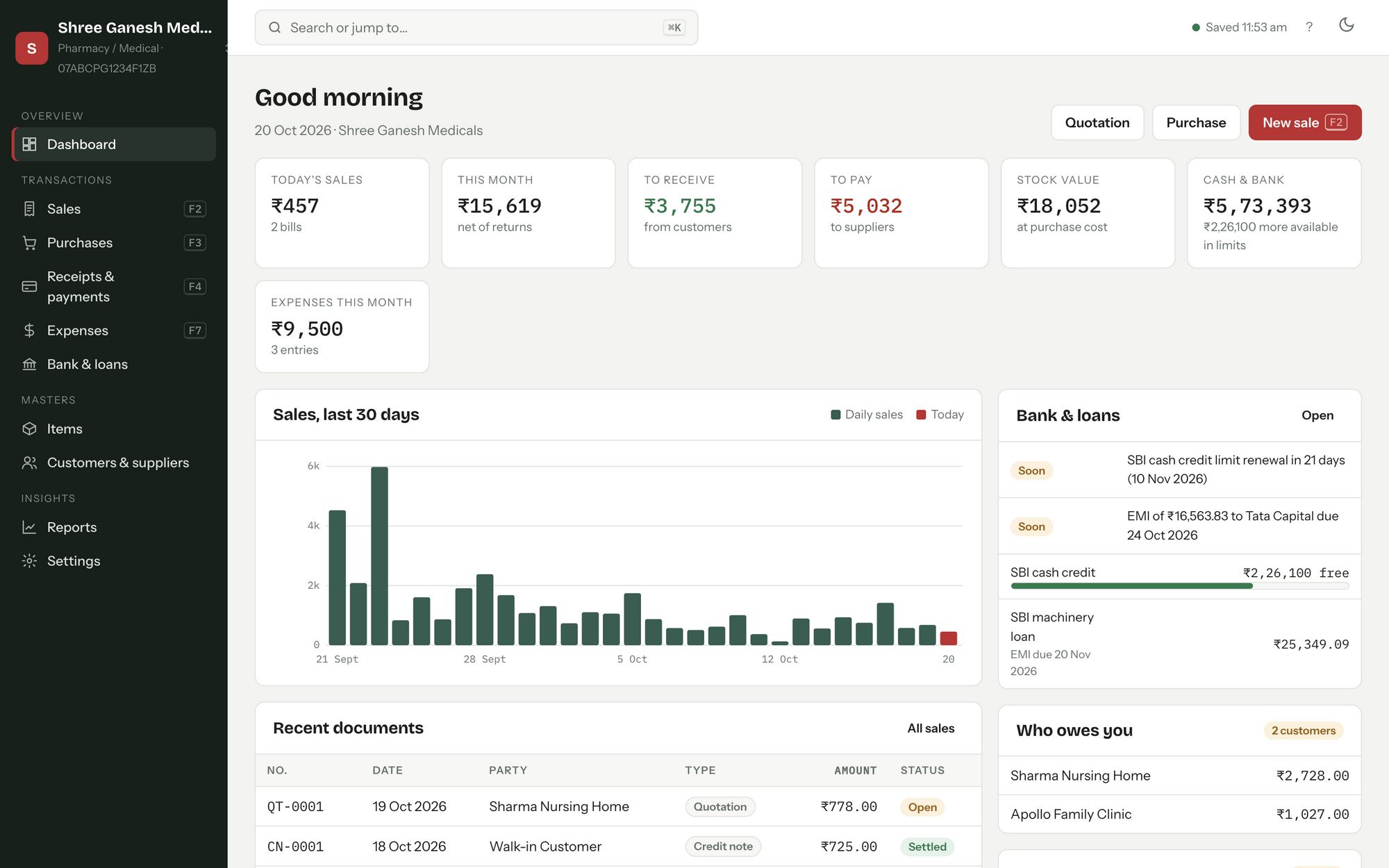
Batches and expiry dates are built in. Milaan flags batches expiring in the next 3 months and lists items at their reorder level, before they turn into a loss.
“The bank called about the CC renewal and the EMI we forgot.”
Your bank limits and loans, on the dashboard. See how much of your cash-credit limit is free and get reminded before every EMI and limit renewal.
“Our CA wants GST figures and it takes a whole day to pull them.”
GST reports in one click. Rate-wise CGST, SGST and IGST for any month or year, ready to print, save as PDF or send as Excel.
“Every year there’s an AMC, a paid upgrade, or a charge for one more feature.”
One simple price, everything included. Every feature in every plan, with updates that install themselves. No AMC, no add-ons.
“I don’t like my business data sitting on someone else’s server.”
Your books stay on your computer. Nothing is uploaded to us. Automatic restore points and one-click backups keep it safe.
“Switching software means typing in thousands of items again.”
Bring your data from Marg. Import your items, batches, stock, customers and suppliers from an Excel/CSV export in minutes.
Why switch
The best of both worlds
Older desktop software is reliable but hard to use. Online apps look modern but need the internet and keep your data. Milaan gives you the good parts of both.
Swipe the table sideways to compare →
| Milaan ERP | Typical older desktop software | Typical online billing apps | |
|---|---|---|---|
| Works without internet | Yes | Yes | No or limited |
| Your data stays on your computer | Yes | Yes | No, on their servers |
| Easy to learn, modern screens | Yes | Often dated | Usually |
| Batch, expiry & MRP for pharmacies | Yes | Usually | Varies |
| Bank CC limits & loan EMI tracking | Built in | Rarely | Rarely |
| Several firms in one place | Included | Often extra | Often a higher plan |
| Updates | Automatic, included | Often a yearly AMC | Included |
| Windows and Mac | Both | Usually Windows only | In a browser |
| If you stop paying | Read-only, data never locked | Varies | Access can stop |
A general comparison with the kinds of software small businesses commonly use. Individual products differ, so try Milaan free for 7 days and judge for yourself.
Features
Everything a small business does every day
Sales, purchases, stock, money and reports in one window. Simple enough for the counter, detailed enough for your CA.
GST bills in seconds
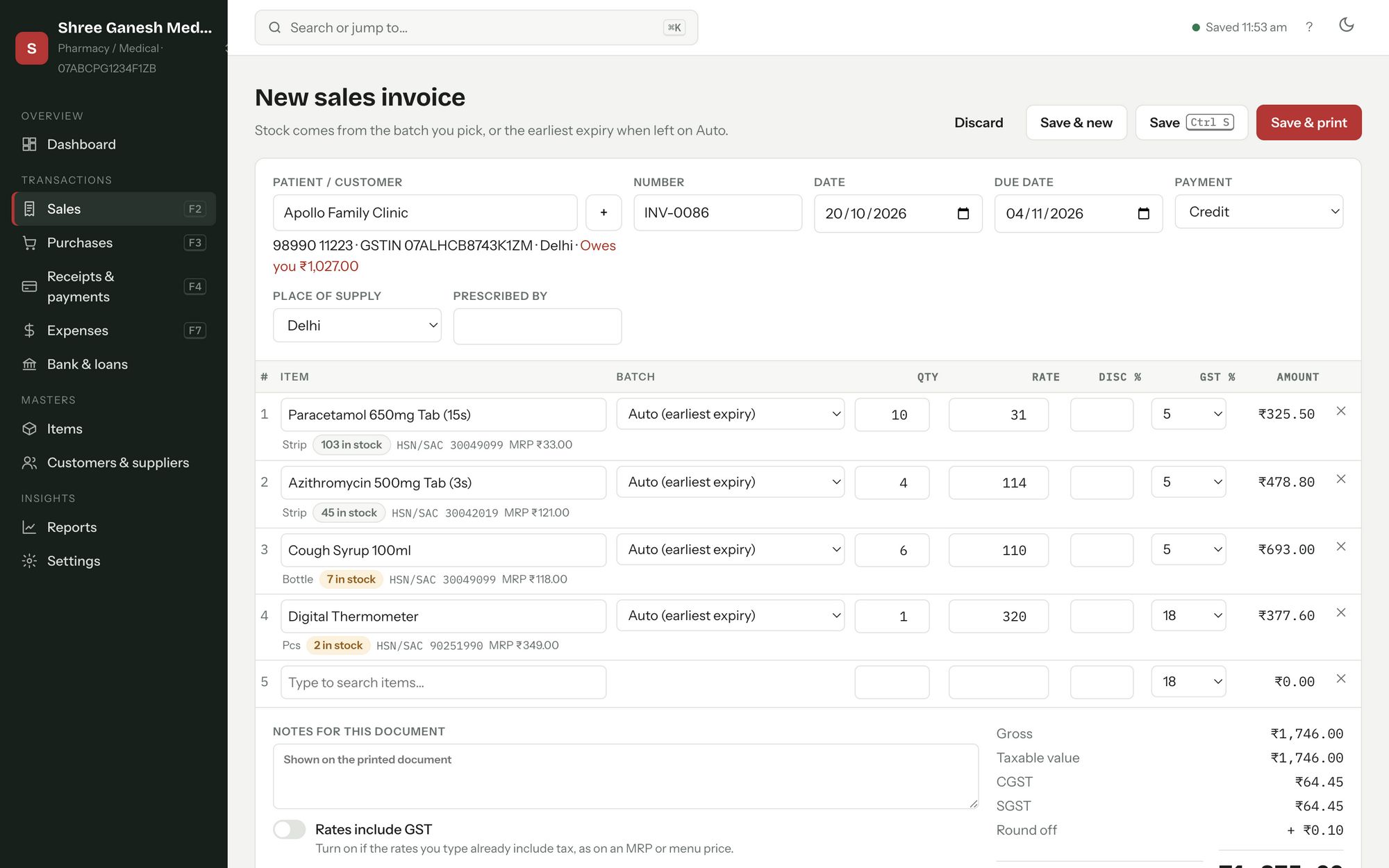
Press F2, choose the customer, type the first letters of an item and add the quantity. Milaan fills in the rate, HSN, batch and GST, works out CGST/SGST or IGST from the place of supply, and rounds off.
- Sales invoices, quotations, returns and credit notes
- Purchase bills and purchase returns
- Print, save as PDF or export to Excel (CSV)
- Receipts, payments and who owes you what
Clean, professional invoices
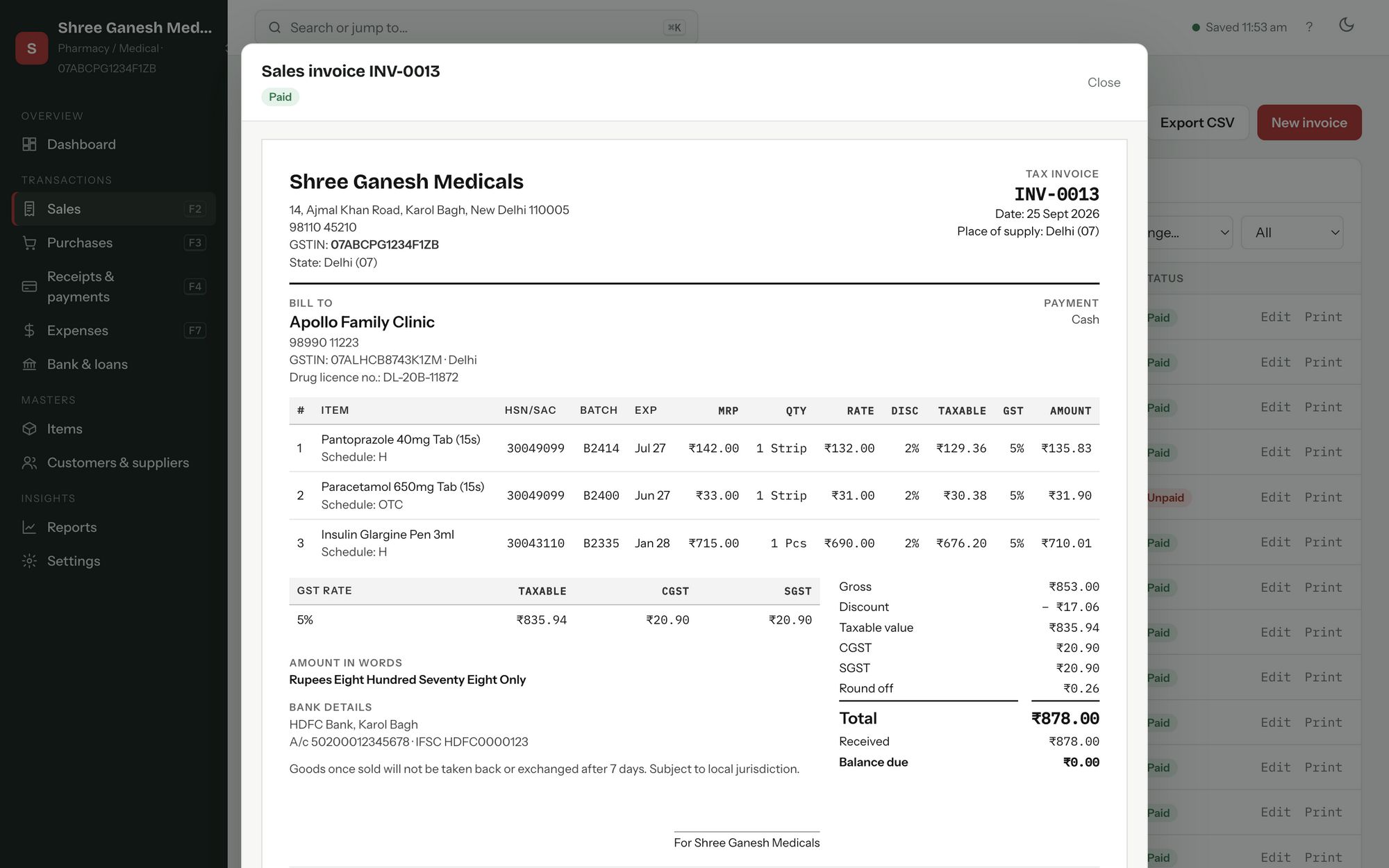
Your name, address, GSTIN and bank details on every bill, with a GST summary by rate and the amount in words. Add your own logo, signature and terms.
- Batch, expiry and MRP columns for pharmacies
- Discounts per line, round off and balance due
- Your own invoice numbering
Stock that keeps itself up to date
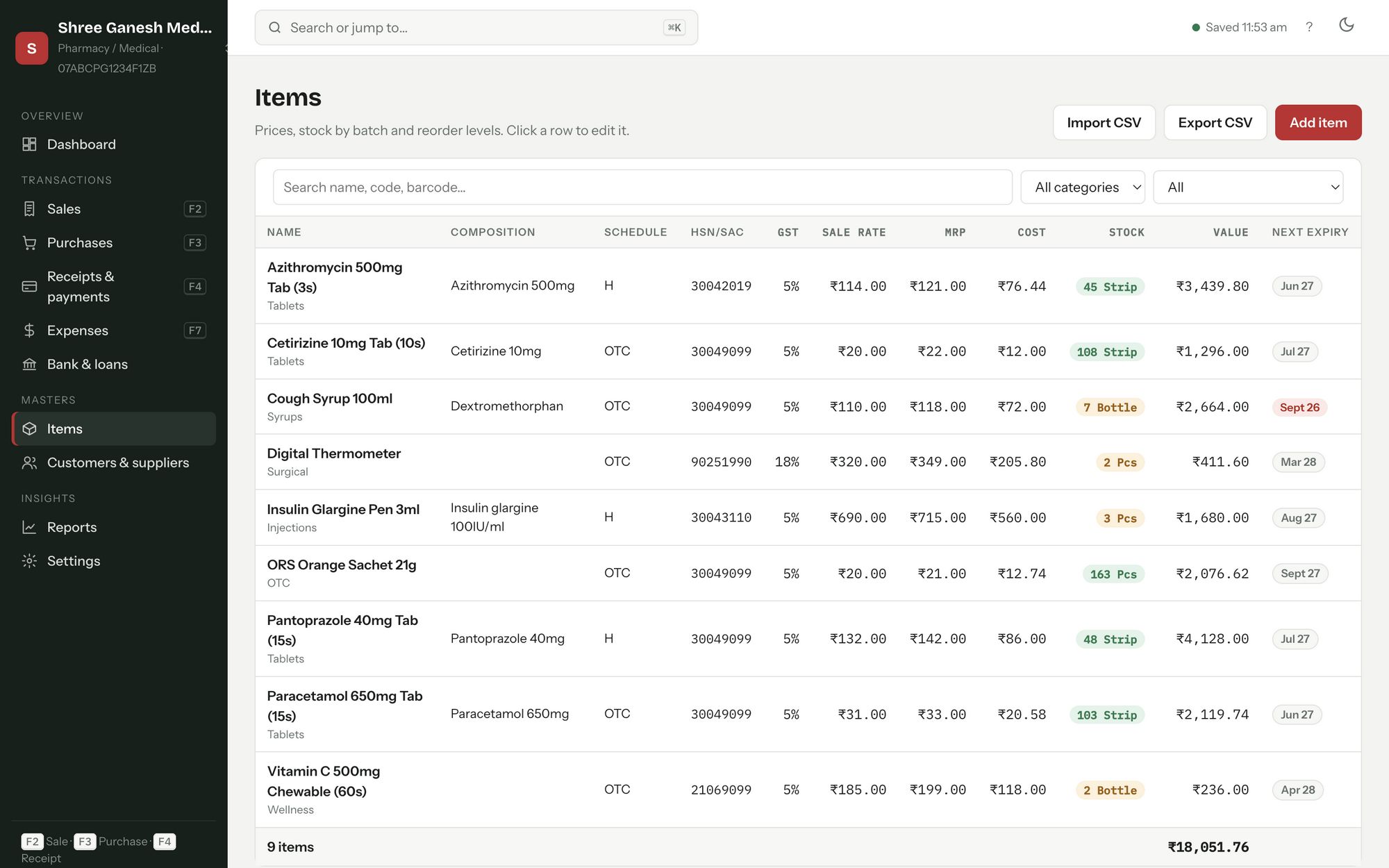
Every sale and purchase moves stock automatically. See what is running low, what is about to expire and what your stock is worth at cost.
- Batches and expiry dates
- Units, categories, HSN codes and barcodes
- Low-stock and expiry alerts
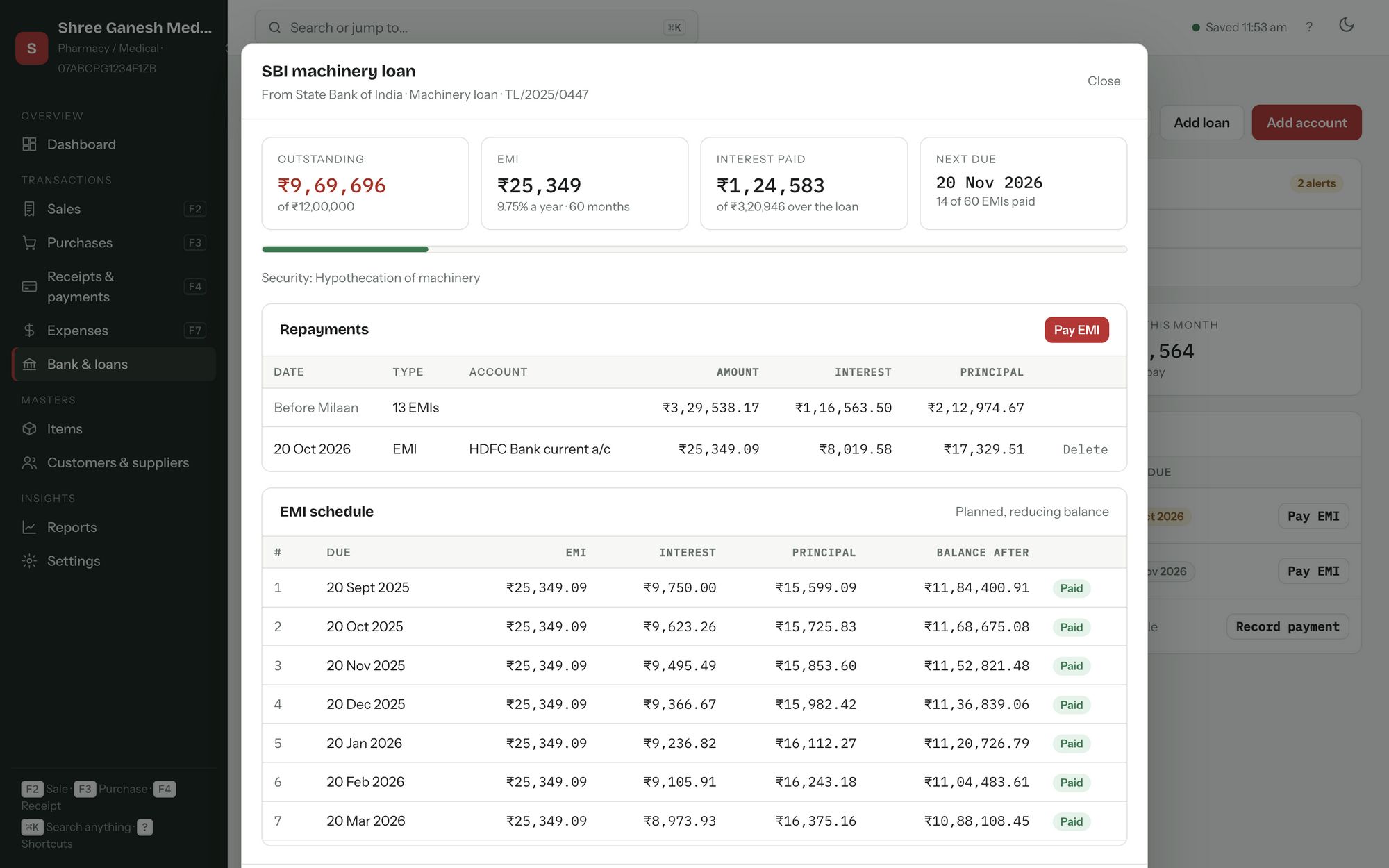
Bank accounts, credit limits & loans
Keep cash, bank and cash-credit accounts in one place. Milaan shows how much of your bank limit is still free, and reminds you before an EMI is due or a limit needs renewing.
- Cash credit and overdraft limits
- Term, vehicle, machinery and partner loans
- Full EMI schedule with interest and principal split
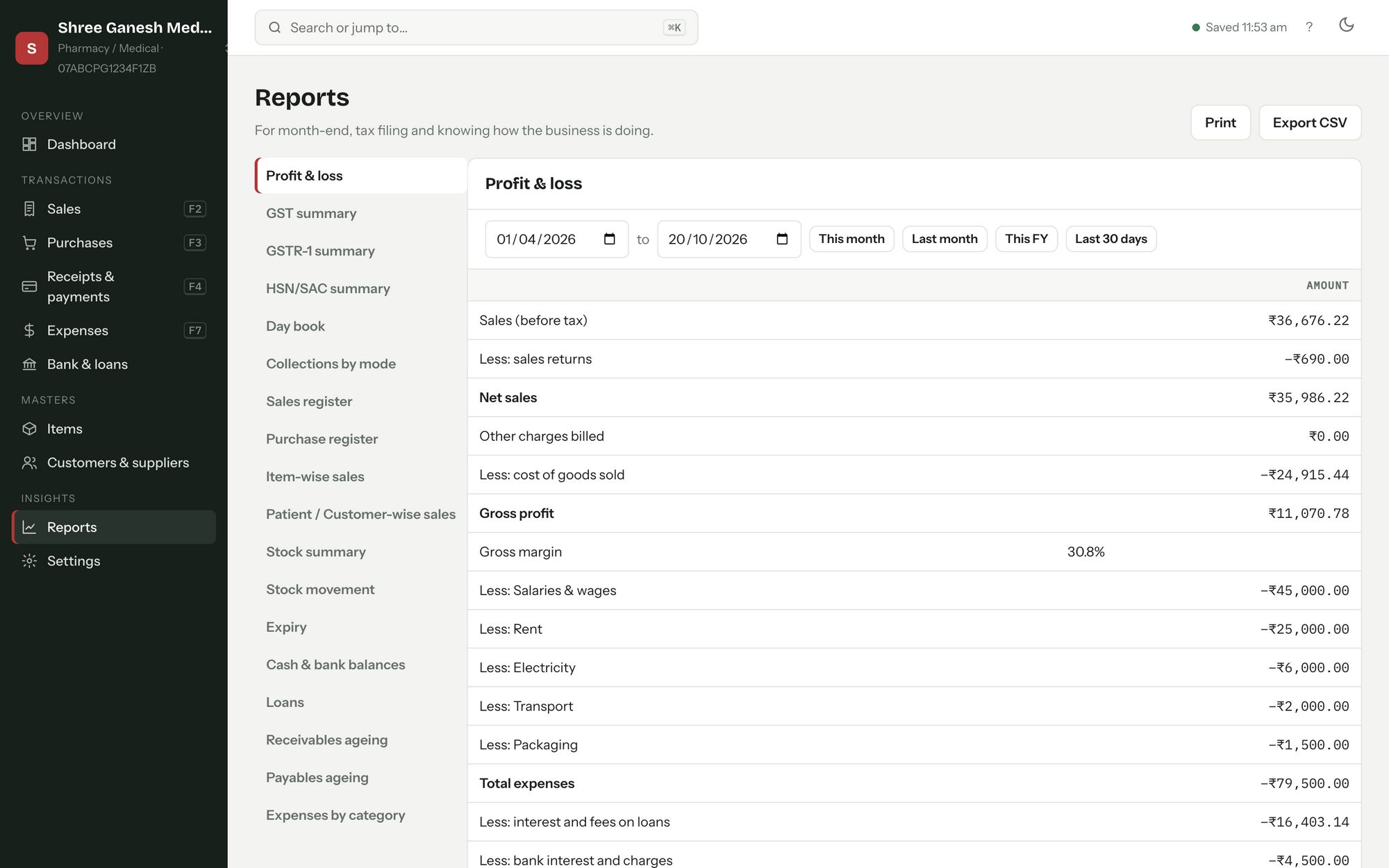
Reports your CA will like
GST summary by rate, sales and purchase registers, profit, stock, receivables and payables, for any date range or financial year.
- Print, PDF or export any report
- Party ledgers and statements
- Expenses by category
More than one firm
Run several businesses from one computer. Each firm has its own books, and you switch between them in a click.
Automatic backups
Milaan saves as you work and keeps restore points, so one mistake never costs you your books.
Free updates
New features arrive on their own while your plan is active. No reinstalling.
Fast with a keyboard
F2 sale, F3 purchase, F4 receipt, and search anything with Ctrl K.
Made for your trade
Ready-made setups for retail, pharmacy, restaurant, apparel, electronics, hardware and services, or build your own.
Easy on the eyes
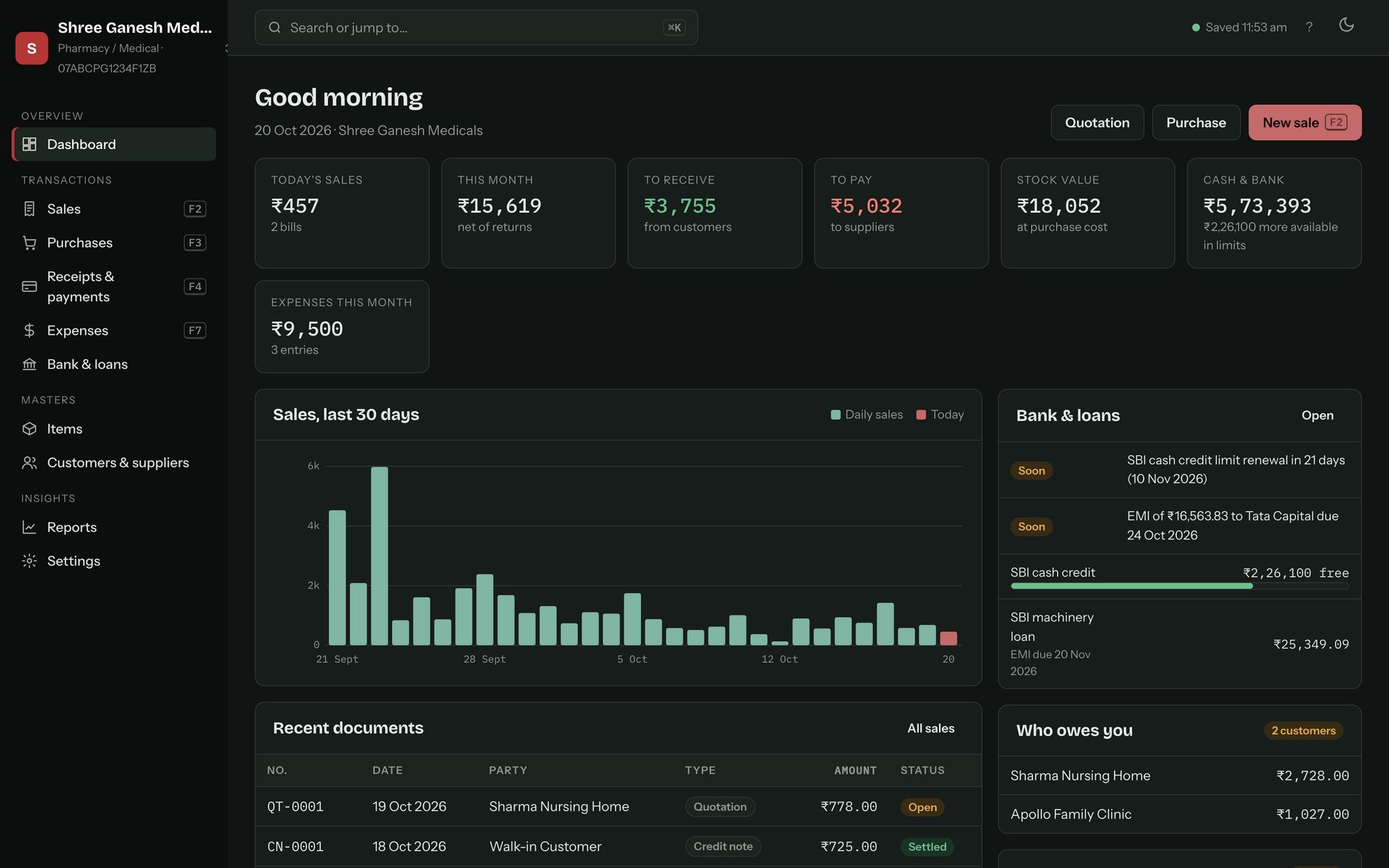
A clean, modern look with a dark mode for late evenings at the counter.
Day and night
Easy on the eyes, from opening to closing
A bright, clean look for the day and a dark mode for late evenings at the counter. Drag to see both.
 ◂ ▸
LightDark
◂ ▸
LightDark
Switch from Marg
Bring your Marg data with you
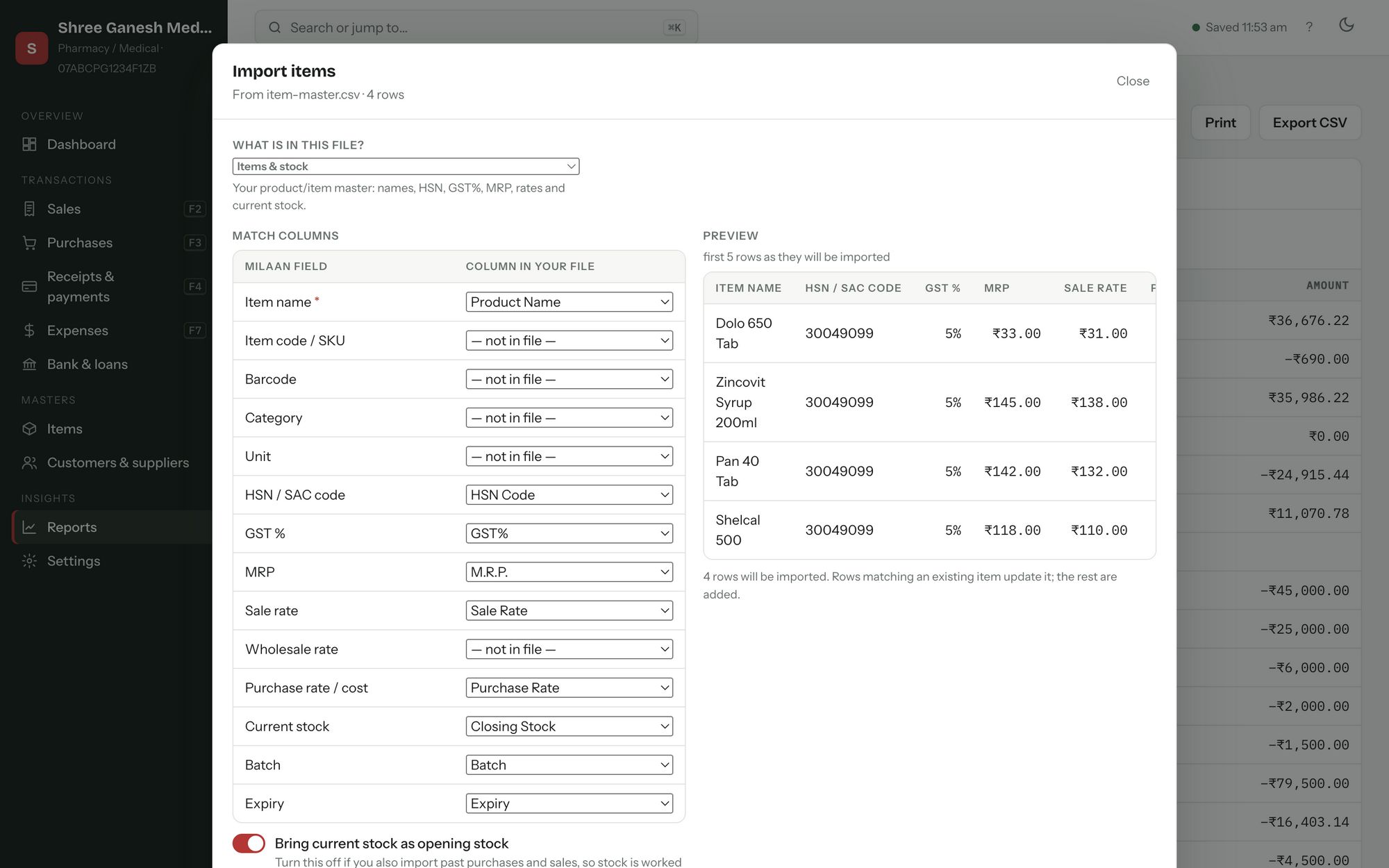
Export your item master, customers and suppliers from Marg as Excel/CSV and open them in Milaan. Milaan recognises Marg's column names, shows you a preview, and brings across HSN, GST rates, MRP, rates, batches, expiry and closing stock.
- Items and stock, with batch and expiry
- Customers and suppliers with GSTIN and balances
- Check everything before anything is saved
Stuck? Send us the file on WhatsApp and we will help you move.
Pricing
Simple prices. Every feature in every plan.
Try everything free for 7 days. After that, the yearly plan works out to less than ₹11 a day, less than a cup of chai, for software your whole business runs on.
Not sure yet? If you don’t buy after the trial, nothing is deleted: you can still open, print and export everything you entered.
All plans include billing, GST, stock, banking, loans, reports, multiple firms, Marg import and updates. Each licence is for one computer.
How buying works
- Message usTap “Buy on WhatsApp”. Your plan is already filled in.
- Pay by UPI or bank transferWe send you the payment details on WhatsApp.
- Send your computer codeIn Milaan, open Help → Licence and tap Copy. Send that code to us.
- Paste your keyWe send a licence key. Paste it into Milaan and you are done. Your trial data stays as it is.
Download
Start your free 7-day trial
Everything works during the trial. Afterwards your books stay safe and readable until you choose a plan.
Latest version · download is about 120–130 MB
Installing on Windows
If Windows shows “Windows protected your PC”, click More info and then Run anyway. This appears for new apps that Microsoft does not know yet.
Installing on Mac
Open the .dmg and drag Milaan ERP to Applications. The first time, right-click the app and choose Open, then Open again. If macOS still refuses, go to System Settings → Privacy & Security and click Open Anyway.
Not sure which Mac you have? Apple menu → About This Mac. “Chip: Apple M…” means Apple chip; “Processor: Intel” means Intel.
Questions
Good to know
Where is my data kept? Is it safe?
Your books are saved on your own computer, in a “Milaan ERP Data” folder inside Documents. Nothing is uploaded to us. Milaan keeps restore points and you can make a backup file any time; copy it to a pen drive or Google Drive for extra safety.
Do I need the internet?
No. Billing, stock and reports all work offline. The internet is used only to download updates.
What happens when my plan or trial ends?
Milaan becomes read-only. You can still open, print, export and back up everything, but you cannot add or change entries until you renew. Your data is never deleted or locked away. Paid plans also get 3 days of grace after the end date to renew.
Can I use it on more than one computer?
Each licence is for one computer. For a second counter or another office, buy another licence. Message us if you need several and we will work something out.
I run two businesses. Do I need two licences?
No. One licence lets you keep several firms on the same computer, each with its own books.
I am changing my computer. What do I do?
Make a backup in Milaan, install Milaan on the new computer and restore the backup. Then send us the new computer’s code on WhatsApp so we can move your licence.
How do updates work?
Milaan checks for new versions by itself and installs them when you are ready. Your data is not touched by updates.
Can I move from Marg ERP?
Yes. Export your items and parties from Marg as Excel/CSV and use Import from Marg in Milaan. We are happy to help over WhatsApp.
Does it work for my type of business?
Milaan has ready-made setups for retail, pharmacy, restaurant, apparel, electronics, hardware and service businesses, and you can rename fields and lists to fit any trade. The free trial is the best way to check.
Give it one week
Put in your real items and make your real bills for 7 days. If Milaan doesn’t make your day easier, you’ve lost nothing, and your data is still yours.
Talk to us
Questions, a demo, or help moving your data. We reply on WhatsApp, phone and email.